
🧩 Architects Weekly #77 | Changelog, Tip: Nested hierarchies in Smart Folders
See what's new in Fibery!
Hi 🍂,
This week's release comes with a preview of creating Custom Integrations via AI, Rich text history in your Inbox and entities, and executing code via MCP. We've also added typed filters in Search, and made improvements to the UX of text tables and performance (especially in Views). This week's tip is about showing nested hierarchies in Smart Folders. Enjoy!
📫 Weekly Changelog — October 15, 2026
Create Custom Integrations via AI fast (preview)
Need Fibery to sync with a tool we don’t integrate with yet? Don’t wait for us (most likely we will never do it). Describe what you need, and AI builds the connector, tests it and keeps your data syncing. This is a preview release, so you may spot some rough edges here and there, but we tested it extensively for many external tools.
To start, click + in the sidebar → Space → Connect via AI and ask:
- “Sync deals and companies from Attio”
- “Sync my books from open library"
- “Sync tickets from our internal API at api.example.com”
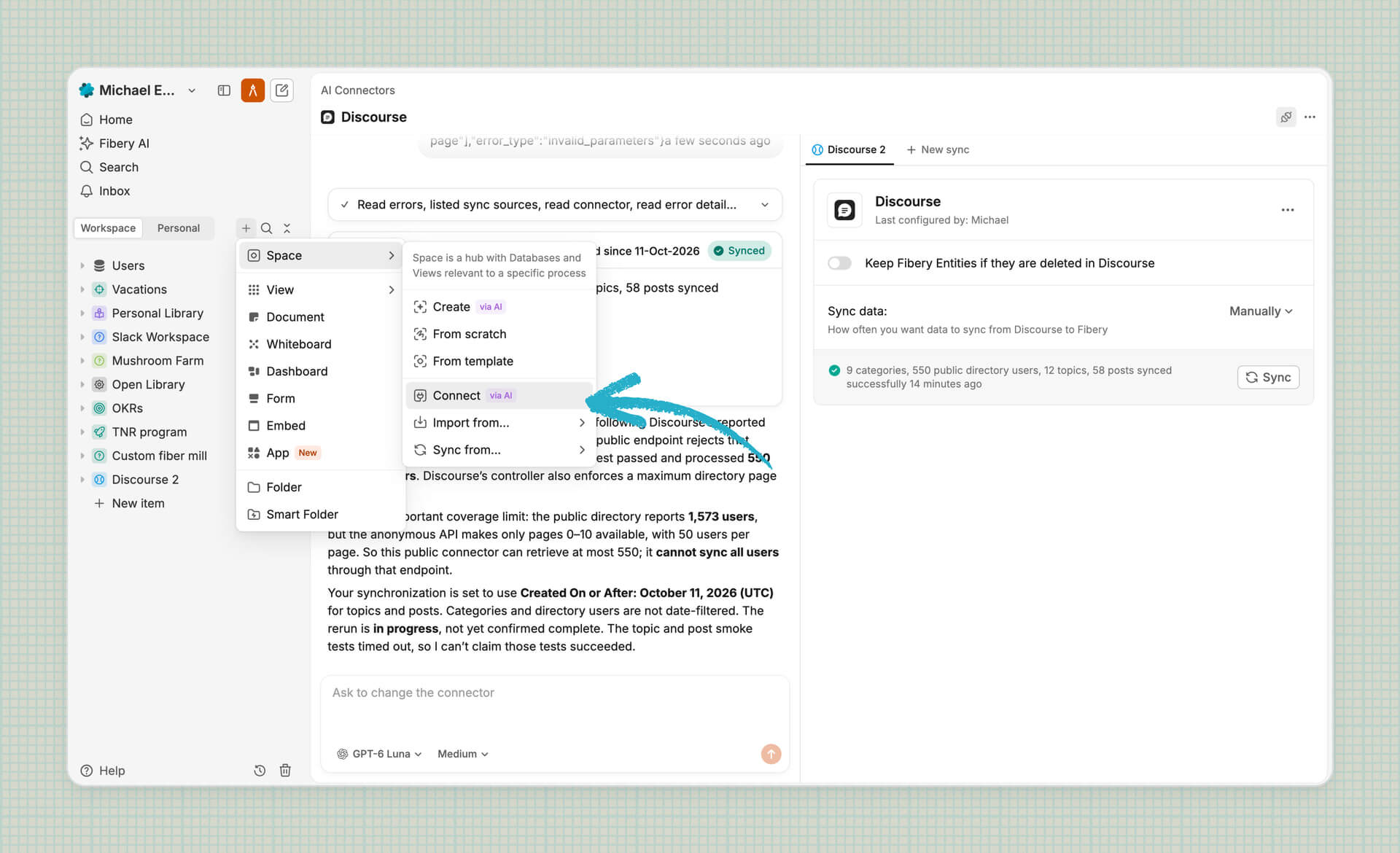
Some important things for you to know:
- Hosting is free during the preview (~2-4 weeks), up to 4 hours of compute per day per workspace. After that, we’ll most likely charge for compute time: the more your connectors run, the more you pay. What we see during the preview will shape the fair price. Note that Custom Integrations are running on Vercel now
- Connectors support OAuth and webhooks (changes arrive as they happen, not at the next sync)
- Building and editing connectors uses AI credits, like any AI chat in Fibery. Lighter models such as GPT-6 Luna or Claude Haiku usually do the job, so try them first
- Current limits: HTTP APIs only, data flows into Fibery only, and there’s no MCP tool for creating connectors yet
There’s no video walkthrough this time, on purpose. We want to find rough edges with you, brave early adopters! Build the integration you’ve always wanted and tell us how it went in the community. Good luck! 🌶️
Rich text changes history in your Inbox and entity history
Finally changes in rich text are properly rendered in entity history with diffs. When you click on a change, you will be redirected to a proper place in the document.
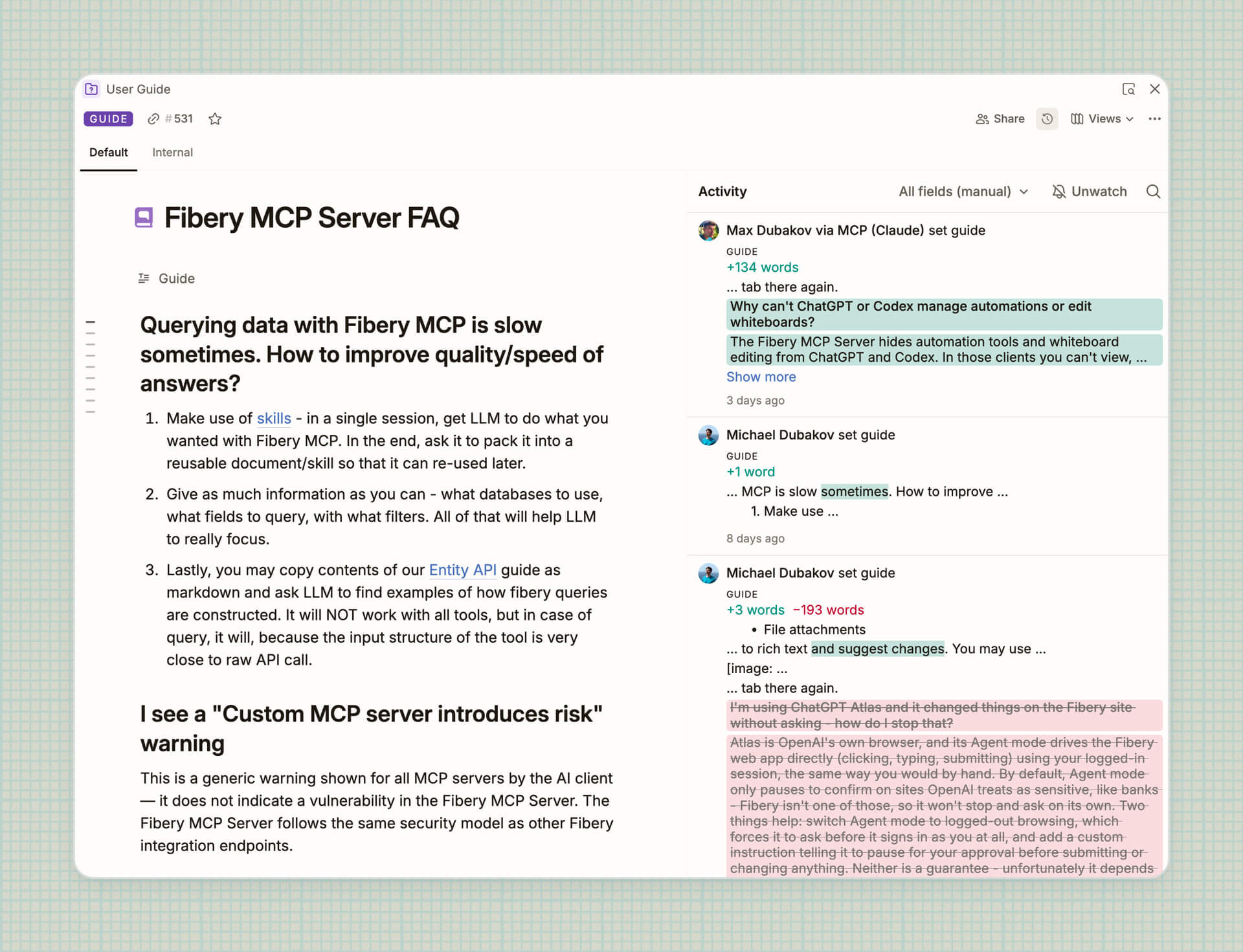
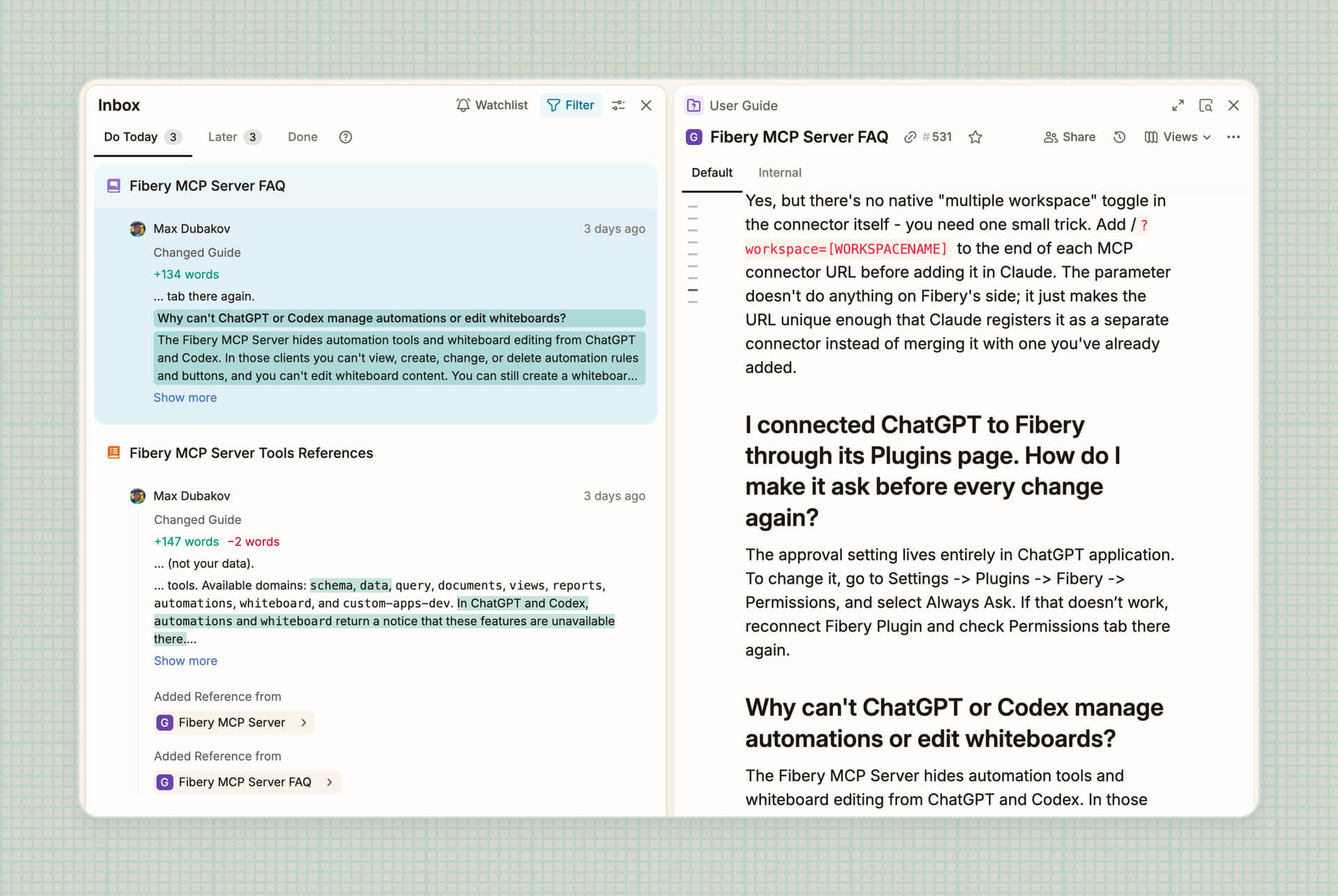
Moreover, now you will receive notifications about changes in rich text fields. Notification is sent when a new version is created in the rich text (about 10 mins of inactivity after the first change).
MCP Server can execute code now
We’ve added execute_code tool to Fibery MCP. AI agents can now write a small script that calls other Fibery MCP tools. It’s useful when an agent needs to chain tool calls, or to process output of the tool with JS right away instead of looking at the raw output. For example, it can aggregate data more efficiently during research and set up multiple parts of workspace in parallel.
In a nutshell, it saves tokens now. In some situations a lot of tokens.
Type filters right into search (experimental)
You can now narrow search down without reaching for the mouse. Type in: to pick a database, then your search text. Or add the filter afterwards, once you realize the entire workspace was a slightly ambitious place to look. Repeat in: to look in several databases at once.
Suggestions appear as you type: arrows to choose, Enter or Tab to confirm, ? to list every filter. You can edit anywhere in the query without disturbing the rest.
A few more filters to play with: created:, by:, people:, and is:Unfinished, plus space: when you’re hunting for views (in:Boards space:Marketing). Prefer clicking? Filter changes made through the UI now appear in the query too. A small syntax lesson nobody signed up for.
in: also works in # and [[ mentions inside documents.
It’s an experiment for now, so turn on Search operators in Settings → Experimental Lab and tell us which filter we forgot.
Text table UX improvements 🖱️
Right-clicking in a table now opens your browser’s menu instead of Fibery’s, so you can copy text, check spelling, and use the usual options.
Table actions now live where they belong: cells, rows, and columns each get their own menu.
💨 Performance improvements
Faster Views (and everything around them). Workspaces with lots of Views should now feel more responsive whenever you setup filters, sorting and columns, rename or move Views in the sidebar, or work with relation Views on Entity pages.
On top of that, Fibery now does up to a third less work behind the scenes, wherever you click.
Spot something sluggish anyway? Our ears are open.
🦋 Improvements
- Table View:
- A click on a rich text cell now just selects it, like any other cell. Click it again or press Enter to open the document, Cmd/Ctrl+click to open it in a new tab.
- Cells and rows are now selected separately. Click cells to work with values, tick checkboxes to work with records. Shift+click a checkbox to select a span of rows, Shift+↑/↓ to grow or shrink it.
- UI:
- The Relation settings panel is now resizable in DB Settings → Relations, making it easier to view longer field labels without them being cut off.
- We recently updated the Automations icon in your Inbox, and now it’s time for a new Formula avatar. Both icons now follow our refreshed visual style and look great together.
- Authentication:
- Show workspace selector on OAuth screen. When you connect Fibery to another app or AI assistant, you no longer have to type your workspace name by hand. The flow now works just like the regular Fibery login: log in, pick a workspace from the list, and approve access. Typos no more!
We've also fixed 36 bugs, see all the details in the changelog!
P.S. We hope you enjoy all the 🍁 releases!
💡 Tip of the Week
Smart Folders are great for organizing information in the sidebar, for example all entities, documents, or views belonging to a certain Team or Project. But you can also display nested hierarchies in Smart Folders for self-referencing or recursive hierarchies. Such wow!
For example, you might want to show a hierarchy of Projects, or nested Product Areas and Features. Select the Database in question and click the Group by the same database relation button to see the entire hierarchy for easy overview and access.

|


