
🧩 Architects Weekly #75 | Changelog, Tip: Customize Entity Mention Fields
See what's new in Fibery!
Hi 🦚,
Ask and you shall receive! This week's release includes Custom Apps as Entity Views, which some of you have been requesting. Now you can display entities just the way you like. We've also added Suggestion mode for documents and rich text, improved tables and whiteboards, and some nice illustrations for empty states and errors in your Inbox.
This week's tip is about choosing which fields to display in entity mentions. Happy customizing!
📫 Weekly Changelog — October 1, 2026
Hi folks! Today’s release includes some fancy things and some QoL improvements. Enjoy!
🔥 Custom Apps as Entity Views: design the entity page you actually need
Describe the entity view you want, and AI builds it. Build a dashboard, a form, a view with custom layout and 3 columns, an interactive game. These are fully working views where users can read and edit fields, related collections or any other things you can imagine.
Enable multiple entity views on any single entity, click Add View → App View, and describe what you want to see:
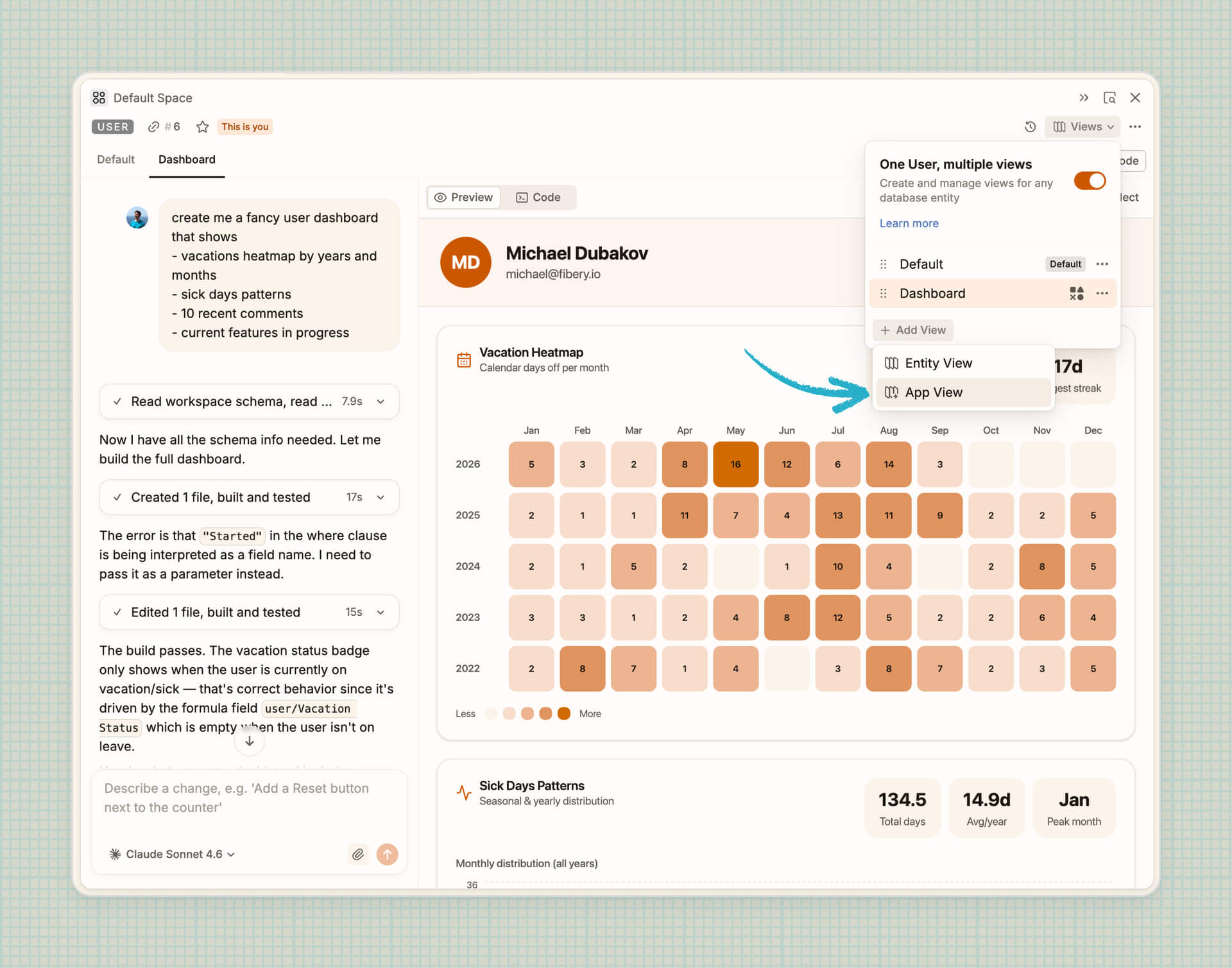
An App View belongs to the database, so every entity gets it. Make it the default view, and everyone sees it when they open an entity.
Some hints:
- Works where entities go: App Views appear in shared entities, so they’re great for client-facing pages. They also are part of space templates.
- Pair it with Custom Apps: Build a custom app, such as a portfolio overview, and entity views in the same style, so users drill from overview to detail with the same custom UI.
- Create View App via MCP: Architects can also build App Views in any agent with Fibery MCP. Try prompt like "Use Fibery MCP and create a custom entity view for Feature that shows [describe your need]".
- Custom Apps as Entity Views are available in Pro and Enterprise plans.
Show us what you got!
🌶️ Suggestion mode: review docs without leaving Fibery
Now you can switch any document or rich text field into suggestion mode: click … → Suggest changes, make your edits, then click the suggestion mode button to exit. Every change shows up in the Suggestions panel on the right with its author, and the document owner can accept or reject all changes or some changes.
Ask Fibery AI or any agent connected via Fibery MCP to suggest edits instead of rewriting your text. You stay in control and accept only what you like. Try something like “Fix grammar and unclear sentences as suggestions”.
NOTE: Suggestion mode has many limitations, you can’t add tables, images, doc columns, embeds, dividers, quotes, callouts, code blocks. These things are relatively hard to add, so we will wait for your feedback before jumping into implementation.
💰 Caps for monthly AI credits (reminder)
As we previously announced, this month we’re introducing the maximum number of AI credits that a workspace can get, regardless of the number of paid seats:
- Standard: 250 AI credits per paid seat up to 10,000 credits;
- Pro: 500 AI credits per paid seat up to 25,000 credits;
- Enterprise: 1000 AI credits per paid seat up to 50,000 credits.
This will only affect the top consumers among the largest workspaces. In fact, only three of our customers have ever reached these caps — we’ve contacted them personally.
If you find yourselves approaching the limit, two suggestions:
- If you’re building Custom Apps, consider doing so via MCP. This doesn’t consume Fibery AI credits and is free for you if you have a Claude, ChatGPT, or another provider subscription.
- If you can’t be bothered with MCP, enable extra usage for AI.
🟨 Even better tables in Documents
We’ve added a few missing pieces to make text tables easier to work with.
- Drag to add or remove rows and columns: Drag the table edge to add rows or columns, or drag back to remove empty ones. Cells with content are never removed this way.
- Duplicate rows and columns: Copy a row or column with all its content and formatting from the table menu. The copy appears right next to the original.
- Fit to width: Make a table match its content in one click, without resizing columns by hand. It adapts to your page width (Narrow, Medium, or Wide).
- Align content: Align text left, center, or right in a cell, row, or column. It’s handy for numbers.
Smarter drawing and styled relation lines on Whiteboards
- Turn on Smart drawing in the pencil options, and your hand-drawn strokes become clean shapes: rectangles, ellipses, triangles, arrows, and more. Draw an arrow between shapes, and it becomes a connector that snaps to them.
- Database relations on Whiteboards now support custom looks. Select a relation line and change its color, line style (solid, dashed, or dotted), shape, and arrowheads. It’s visual only, your data and relations stay the same. Use it to highlight important links or group relations by different style.
🐶 New illustrations in Inbox
Finally, Inbox screens got some extra love (and dogs). We’ve created a new collection of Inbox illustrations in Fibery’s fresh visual style, covering empty states, errors, and all those “can’t display this” moments, with full light and dark mode support. We hope you won’t see the error states too often, but when you do, at least you’ll have some nice artwork to look at.

🤦 Facepalms
On September 29 a bug in our release caused every rich text save to refresh the modification date of all entities with a rich text field, not just the one being edited. No content was lost or changed, only the modification dates were affected. We fixed it the same evening and are adding alerts to catch anything like this within minutes, not hours. We’re truly very sorry!
🦋 Improvements
- AI: Claude Sonnet 5.5 is added to Fibery AI and Custom Apps builder.
- File field: Now you can use File Field in Lookups and Formulas. For example, see all tasks attachments in a project.
- Modification date: Now when a rich text field is updated, modification date is updated as well.
- Activity log: Now you can see details of rich text field changes in activity log. Click the Details button on an event row.
We've also fixed 15 bugs, see all the details in the changelog! There's also lots of screen recordings of new features — they're too big to fit in an email 😔
P.S. Yet another week to delight and surprise you. Enjoy!
💡 Tip of the Week
Mentioning entities using # is handy for nicely showing and linking an entity in your text, but you can also change how the mention looks by displaying other relevant fields. For example, you want to mention a Feature but it's also relevant to show what state it's in, who it's assigned to, or what overarching theme it belongs to.
After adding your mention, hover over the database icon and click ... to bring up the menu where you can select which fields to display. This is set per database and for all users.

|


