
🧩 Architects Weekly #74 | Changelog, Tip: Converting Entities
See what's new in Fibery!
Hi ✍️,
We've got many different gems in this week's release. Better tables in Rich text, more page widths, seeing where a Field is used before deleting, better document history changes, and more. We've also got a tip on converting Entities between Databases. Enjoy!
📫 Weekly Changelog — September 24, 2026
Our designers have started coding! Beware! 🍟
Better tables in Rich text
Working with tables in documents just got a lot smoother:
- Drag to reorder rows and columns. Hover over the left or top edge of a table to reveal a grip. Hovering highlights the whole row or column. Click to select it and open the menu, or drag to move it anywhere in the table.
- Right-click for everything. Right-click any cell to select it and open a menu with all table actions.
- Colorful cell highlights. The single grey “Mark cell” option is gone. You can now pick any color from the text highlight palette and apply it to a cell, row, or column.
- Clear contents. Empty the selected cells in one click, without deleting rows or columns.
See where a field is used before you delete it
Deleting a field used to be risky. You deleted it, found out what broke, brought the field back, fixed everything, and deleted it again.
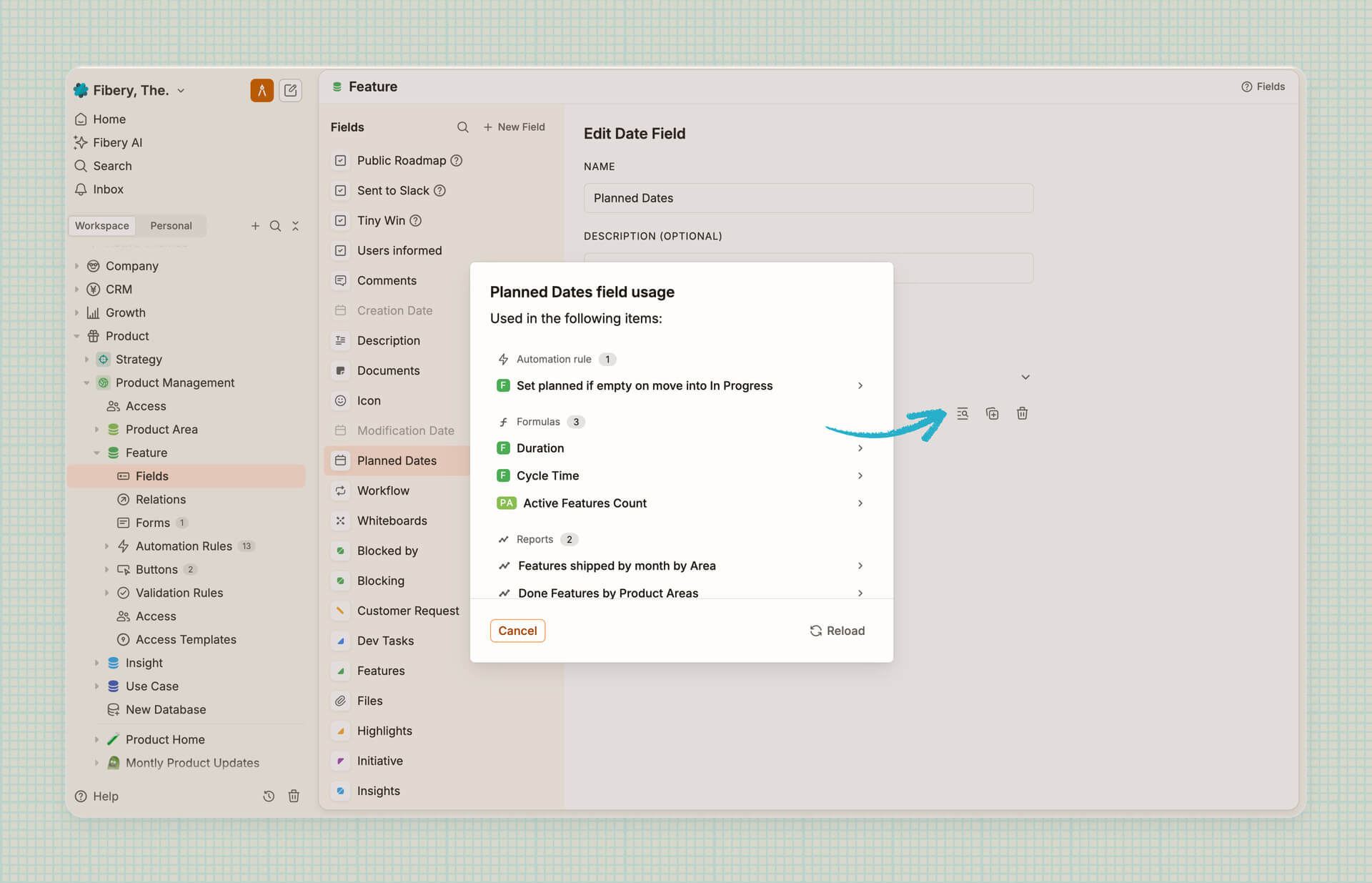
Now, when you delete a field, Fibery first shows you where it’s used: formulas, lookups, automations, and reports, even in other databases. Click any item to open it and fix it first.
If you just want to take a look where a field is used, click the Check usages action on any field and explore the list:
LIMITATIONS:
- If a field is used in Automation Scripts or Markdown template, it is not included into this list.
- In the next releases we will expand this list and add all views, validation rules, access templates and maybe even custom apps.
New fields are not added to all entity views
If a database has several Entity Views, new fields are no longer added into all of them. Create a field right from an Entity View, and it shows up only there. Create it anywhere else (Database screen, other Views, integrations, API), and it stays hidden until you add it in Manage Fields and columns. No more cleaning up views one by one after new field addition!
Choose page width in documents and entities
Documents and entity views now have three width modes, so they look good on any screen.
- Narrow is best for reading. Lines are shorter and text is easier to follow.
- Medium works well for most screens and everyday work.
- Wide gives you as much space as possible. Handy for big tables or large monitors.
Try them out and pick the one that suits you.
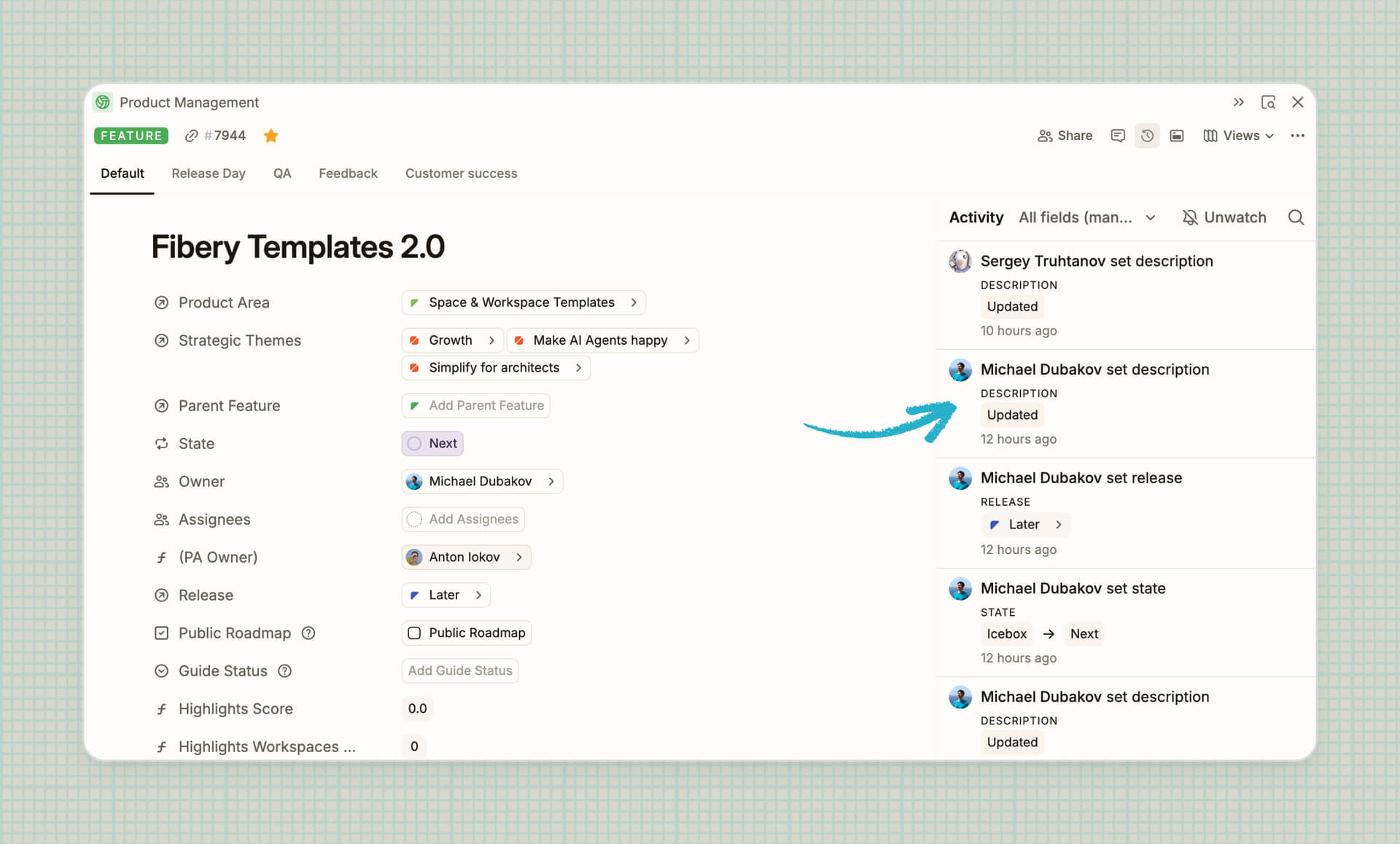
Show document history changes in entity activity and activity log
Now rich text fields updates inside any entity are visible in the changes history. So far only the fact of the update is visible and you have to click to see additional details about what was changed.
🌬️ Performance
Faster updates across Views. We’ve made a sizeable cut in the work Fibery does when entities change, so busy views should feel noticeably more responsive. The improvements are especially useful in large workspaces where teammates, automations, and integrations keep things moving. We’ve also trimmed some processing work during initial loading.
We have ~1.5 people (with many parallel agents) working on performance now, so regular updates are expected.
🦋 Improvements
- Automations:
Notify Usersaction now sends a notification even if the user doesn’t (yet) have access to the corresponding entity — useful when you assign them (= give access) with another action in the same automation. - Fibery AI:
- Fibery AI agent can now search the web, and fetch content from public pages in LLM-friendly format
- Latest models added to Fibery AI, including Opus 5.5, GPT 6 Sol, GPT 6 Luna
We've also fixed 22 bugs, see all the details in the changelog!
P.S. We keep making Fibery better for you every day (well, except most weekends) 💛
💡 Tip of the Week
If you need to reclassify an Entity from one Database to another, you can convert it without losing any data. For example, changing a Feature to a Bug, while keeping mentions and references intact. The original Entity is deleted but can be restored if necessary.
In Entity View, Table View, or the context menu you can select the Convert action. Then you find the Database you want to convert to — you can also search for it — and pick your target!

|


